

About
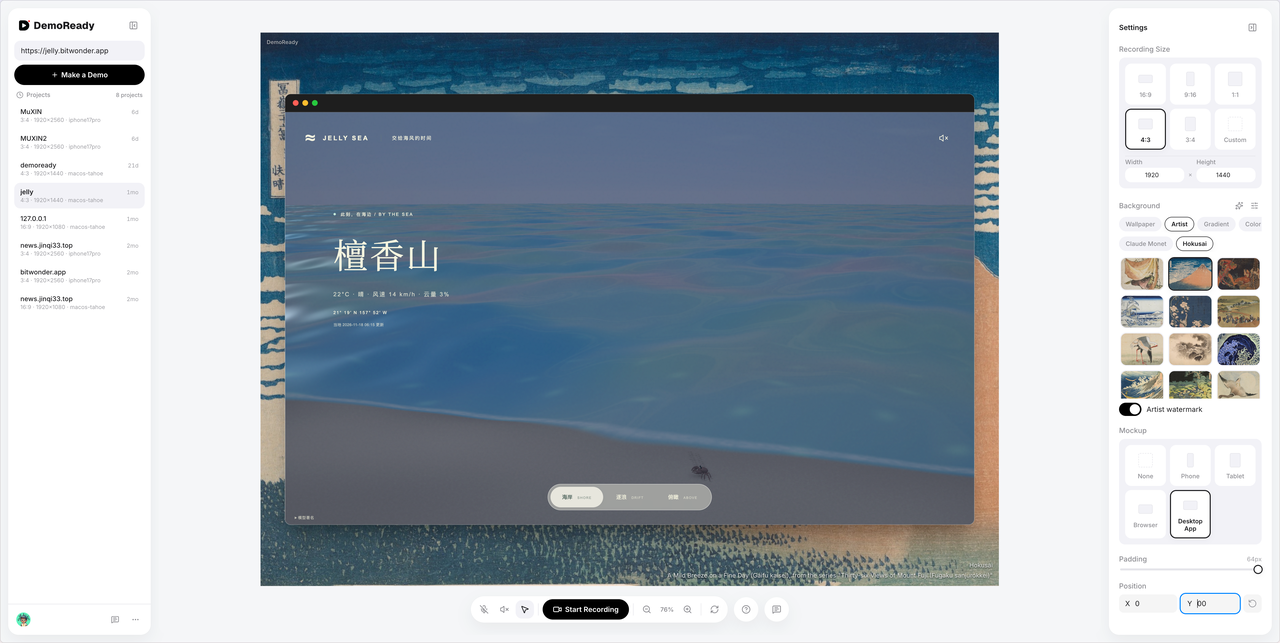
DemoReady records demo videos for vibe coders whose product already has a link. Paste a URL, it loads inside a clean canvas — browser, desktop, tablet or phone shell — and you click through what you just built. What comes back is an MP4 you can post to X, Product Hunt or a landing page without editing anything first.
Built for people shipping fast with AI: when the product is a working MVP tonight and a promo video would take a week, this is the shortcut.
How it works
- Open demoready.bitwonder.app and paste a public product link.
- Pick an aspect ratio, a device shell and a background, adjust the padding.
- Record while you walk through your core flow, then download the MP4.
What it gives you
- Only the canvas is recorded: no Dock, no notifications, no whole-desktop capture.
- Canvas settings are remembered per project, so the next demo starts where the last one ended.
- Web, desktop, tablet and phone shells let a web MVP look like a finished app.
- No install. Everything happens in the browser.
Honest limits
- No editing. The goal is to record it right the first time.
- Not a demo generator: every click recorded is your real operation.
- The link has to open on its own; DemoReady does not host or deploy anything.
- Output is MP4, and pages that refuse to be embedded cannot be recorded.
Similar & Alternative Tools
Explore popular tools in the same category upvoted by the community.


Featured Partners
AD
Real-time captions and voice input for every conversation. AI-powered transcription and translation across 50+ languages.
The admin panel you use after AI built the app
Build a Profitable Launch Site in Minutes

Catch every website question,and follow up after the chat
Be seen on every page. Only 4 spots left